FLEET BACKUP & DISASTER RECOVERY — Proposal (v2, post-critique)
For: Byron · Machine: Mia (Mac Mini) · Targets: NAS + immutable cloud + air-gapped drive · Threat model: ransomware (encryption and exfiltration/extortion), runaway process, disk failure, fire/theft
Executive summary
Where you are. A real backup system already exists (~/fleet-backup/): encrypted snapshots of every agent's config + workspace + crons, the OB1 Postgres dump, Docker image digest pins, secrets sealed in secrets.enc, 3-deep rotation, and a 15KB DR runbook. Good work — but it writes only to Mia's own disk, so any disk failure, theft, or ransomware destroys the backups with the machine. Each snapshot is only ~1.6 GB (the irreplaceable set is small; the 160 GB is re-downloadable Ollama models), which makes a much stronger posture cheap.
The proposal, and what a hard review changed. A 3-2-1-1-0 design — but built on three corrected principles the first draft got wrong:
- Assume the repository is readable by an attacker. restic is symmetric: to write hourly backups, the key is on Mia — so a compromise can read every secret you own. Backups defend integrity and availability, not confidentiality. The plan therefore centers a credential-rotation inventory + post-incident "rotate everything" procedure, and treats the real modern ransomware move (steal-then-encrypt) as in-scope.
- Nothing on Mia may be trusted to verify itself. Integrity checks, the ransomware canary, retention/prune, and alerting run in an independent trust domain (the NAS and a cloud dead-man's-switch), never as a process on the machine they're protecting. A compromised Mia going silent must itself trigger the alarm.
- "Offsite" means off-premises. The NAS is in the same room as Mia — fire/theft takes both. The true immutable offsite is cloud object storage with Object Lock (Backblaze B2 / S3 compliance mode) — a few GB of hot data for pennies a month, unerasable for a fixed window even by the account owner. The NAS and an air-gapped USB are the fast and offline layers around it.
Decision sought. Approve the approach; grant a least-privilege NAS repo path and a B2/S3 bucket with Object Lock. Then I migrate the existing local backup into an offsite, immutable, independently-verified system — reusing the runbook and encryption already built.
Target-state architecture
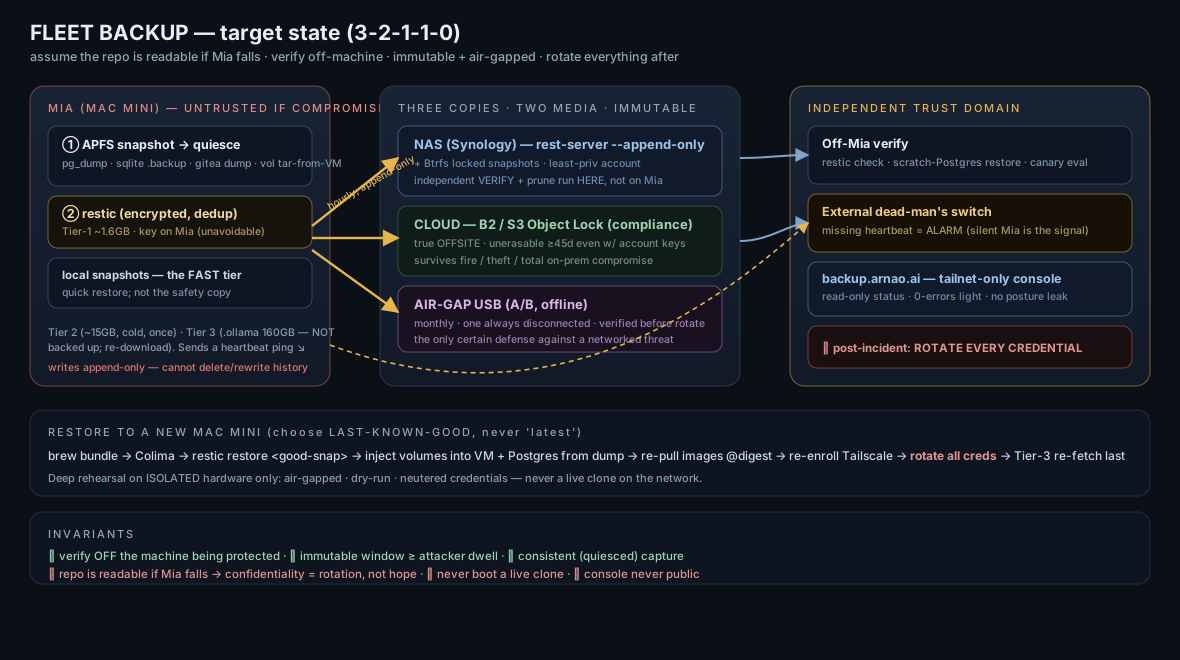
Open the target-state architecture diagram full-size, or jump to the hardened console mockup.
1. What has to be saved — three tiers (measured)
| Tier | Contents | Size | Policy |
|---|---|---|---|
| 1 · Irreplaceable | Docker volumes (agent sessions/credentials/data/agent-state), OB1 Postgres dump, openclaw-gia/config (memory, skills, project source, data, .env), ~/.claude, gitea repos+config, ~/.ssh, all keys/tokens, LaunchDaemons/Agents plists, ~/.zprofile, Homebrew Brewfile | ~1.6 GB (dedup ⇒ small increments once capture is consistent — see §5) | Hourly, encrypted → NAS and cloud-immutable. |
| 2 · Re-derivable, slow | Avatar model envs (~9 GB), jlens 27B model, Python venvs | ~15 GB | Cold: snapshot once; documented re-fetch is the real recovery path. |
| 3 · Re-downloadable | ~/.ollama (160 GB), Homebrew binaries, node_modules, Docker images (digest-pinned) | ~180 GB | Never backed up — restore = re-run installers, ollama pull, docker pull @digest. |
Routine backup moves single-digit GB, which is what makes hourly + offsite + immutable affordable.
2. Consistent capture (the fix for torn backups)
Hourly file-copies of live databases produce corrupt restores. So capture is quiesced, not naive:
- APFS local snapshot first (
tmutil localsnapshot) → back up from the frozen snapshot, so every file is crash-consistent as of one instant. - Postgres (OB1):
pg_dumpinside the container is the source of truth; the live PGDATA volume is EXCLUDED from the file backup (a live copy is torn). - SQLite (agent state,
~/.claude, WAL-mode): captured viasqlite3 .backup/ WAL checkpoint, never a raw file copy of an open DB. - Docker volumes: exported by tar from inside the Colima VM (
limactl shell colima docker run -v … tar), since they live in the Lima disk image, not on macOS — with the agents' writers briefly paused for consistency. - gitea:
gitea dump(not a live data-dir copy). - TCC/Full-Disk-Access: the backup LaunchDaemon binary is granted FDA once (documented), or it silently can't read
~/.ssh/~/.claude. Sleep is handled withcaffeinate/pmsetwake windows so scheduled runs actually fire.
3. Rotation & the honest RPO (GFS + 3-2-1-1-0)
- Hourly restic snapshot of Tier 1 → NAS append-only repo and cloud-immutable bucket.
- Retention: 24 hourly · 14 daily · 8 weekly · 12 monthly. Prune runs only from the NAS/independent context, never from Mia.
- Immutable window ≥ 45 days (Object Lock + Synology locked snapshots) — deliberately longer than assumed attacker dwell time, so an intruder cannot simply wait out your clean history.
- Weekly
restic check --read-data-subset=10%(⇒ all data deep-verified every ~10 weeks) run from the NAS, plus a real scratch-Postgres restore test. - Monthly air-gapped USB sync (two drives, A/B — one always disconnected), verified from a trusted host before rotating, since the plug-in window is itself an attack window.
- Honest RPO: with immutable+offsite, effective recoverable point after a total Mia+NAS compromise is bounded by the cloud Object-Lock window (~30–45 days of history) — stated plainly, not glossed.
4. Ransomware & runaway hardening (corrected)
- Append-only is a protocol mode, not an ACL. Achieved via restic rest-server
--append-onlyon the NAS and Object Lock in the cloud — a compromised client can add but cannot rewrite/delete. (Borg is not offered — its append-only defers deletes into a log a later prune executes: a footgun here.) - Confidentiality is handled by rotation, not by pretending the key is safe. Because the repo is readable if Mia falls, §6 is a rotate-everything inventory; the offsite copy's value is a clean restore point, and the assumption is all backed-up secrets are burned on compromise.
- Cloud Object Lock (B2/S3 compliance) — the real immutable offsite; unerasable for the lock window even with account credentials.
- Air-gapped USB — the only defense certain against a threat reaching every online system; offline except during a verified sync.
- NAS is itself a target (SynoLocker/eCh0raix): so — DSM 7.2+, firmware current, no QuickConnect / no exposed DSM / no SMB1, dedicated least-privilege backup account, 2FA on admin, immutable Snapshot Replication enabled. (I will not take DSM admin as a standing credential; provisioning is one-time, then that access is removed.)
- Independent verification + dead-man's switch.
restic check, the canary evaluation, and prune run off Mia. Alerting uses an external dead-man's switch (e.g. healthchecks.io): the backup pings it on success; if the ping is missing — the exact thing a compromised, silent Mia produces — the switch alerts you. Mia is never trusted to report its own health. - Runaway containment: retention by count/age (not size) so a disk-filling process can't evict real history; disk/rate alerts fire first.
5. Validation — safe, and actually meaningful
A · Continuous, zero production risk (run from the NAS/independent domain): restic check; restore the OB1 dump into a throwaway Postgres and run a real query (not just pg_restore --list, which a truncated dump passes); sqlite3 integrity_check on restored SQLite; decrypt-test secrets.enc. Proves restorability, touches nothing in production.
B · Deep rehearsal on isolated hardware — under three iron rules that make a live clone impossible:
- Air-gapped — no tailnet, LAN, or internet route; a restored fleet must not join as a second "Gia."
- Dry-run — message-sending and outbound API calls disabled.
- Neutered credentials — the clone runs with rotated/fake tokens so even a slipped isolation can't act as production.
Prefer a bare-metal second Mac Mini (also tests the Homebrew/TCC/Colima bootstrap a nested VM skips). A rented cloud Mac means shipping every secret to third-party hardware — acceptable only with the neutered-credential rule, and noted that it then doesn't test the real secret chain. Pick explicitly.
> ⚠️ Cardinal rule (red in the runbook): never boot a restored clone on the live network with live credentials. Two agents sharing one identity = double-processing, WhatsApp session theft, duplicate deploys.
6. Post-incident: rotate everything (new — the missing half of ransomware DR)
If Mia is compromised, assume the repo was read. The runbook includes a credential inventory and rotation order: gog Google OAuth (Gmail/Calendar/Contacts) · gitea token · Vercel token · GoDaddy API key/secret · Anthropic · Gemini · xAI · LinkedIn access token · OWNER_KEYs (branding/city) · OB1 Postgres URL/password · Tailscale auth/machine keys · all ~/.ssh keys (regenerate + re-authorize) · the restic repo key (rotate + re-encrypt). Each with where it's used and how to rotate. A backup you can restore into a world where the stolen keys still work is only half a recovery.
7. Restore to another device (runbook shape)
- Choose the snapshot — never
restore latest. Ransomware persistence (workspace source, plists, crons) lives in Tier 1. Identify last-known-good before the incident using the independent timeline; forensic pause; scan restored content before executing anything. - Offline bootstrap-credential chain (all in your password manager, none only-on-dead-Mia): NAS address + rest-server creds · B2 keys · restic repo password ·
secrets.enckey. Missing one deadlocks the recovery. - Fresh macOS → Homebrew →
brew bundle(Brewfile) → Colima (saved profile) → grant TCC/FDA. restic restore <good-snap>→ config,~/.claude, gitea,~/.ssh, keys, plists.- Docker volumes injected into the VM (
docker run -v … tar -x), not dropped in as macOS files; OB1 restored from dump (mind Postgres major-version match);gitearestored. - Re-pull images by digest — with the caveat that a registry can GC an untagged digest and gitea (the mirror candidate) is inside the fleet being restored: so a small external registry mirror or a
docker saveof pinned images is kept in Tier 2 to break the circular dependency. - Re-install LaunchDaemons; re-enroll Tailscale (new machine identity); rotate per §6; Tier-3 re-fetch last, in parallel, while the fleet is already live on Tier 1.
RTO honest estimate: a few hours to a working fleet, which the first rehearsal will correct — that's what rehearsals are for.
8. backup.arnao.ai — hardened console (tailnet-only)
→ See the static mockup of the console (sample data; the real one ships in Phase 3, tailnet-gated).
Entire console is Tailscale-gated — not just a "detail view." A public page showing retention depth, canary state, and air-gap-drive-last-connected is a targeting package for an attacker (tells them how long to dwell and when your offline copy is stalest); it never ships publicly. Read-only, no mutating endpoints, no secrets rendered, minimal publish pipeline (to shrink the Vercel-token blast radius). It shows: last backup per tier · size · retention ladder · last independent restic check + scratch-restore result (one 0-errors light) · canary status · cloud Object-Lock + air-gap freshness · RPO/RTO · restore-runbook link. It reports; it cannot act.
9. Phases
| Phase | Scope | Effort |
|---|---|---|
| 0 | NAS rest-server append-only repo (confirm this Synology supports it + Object-Lock-equivalent immutable snapshots) · B2/S3 Object Lock bucket · consistent-capture harness (APFS snapshot + quiescing) · throughput/quota math | 1 day |
| 1 | Offsite the essentials: Tier-1 hourly → NAS and cloud-immutable; retention; keep local as the fast tier | 1 day |
| 2 | Hardening: append-only, Object Lock, NAS lockdown, canary, least-priv account, external dead-man's switch | 1–2 days |
| 3 | Independent validation (off-Mia check + scratch-Postgres restore) · credential-rotation runbook · tailnet-only console | 2 days |
| 4 | Cold + air-gap (Tier-2 once; monthly A/B USB rotation) · first deep rehearsal on isolated hardware | 1 day + rehearsal |
10. What I need from you
- Least-privilege NAS repo for restic rest-server append-only (or DSM admin once to self-provision, then that access is removed).
- A Backblaze B2 (or S3) bucket with Object Lock — I'll size it (~a few GB hot; pennies/month).
- Two external SSDs for the monthly air-gap A/B rotation.
- Agree the restic repo password +
secrets.enckey live only in your password manager (I generate; you store; never plaintext on Mia). - For the deep rehearsal: a spare/second Mac Mini quarterly (best), else I design around a cloud Mac with neutered credentials.
11. Self-critique — the Fable adversarial pass
Draft 1 was run through Claude Fable 5 as a hostile senior-SRE review. It found real, load-bearing errors — all fixed above. The disposition:
- "The offline-password story is impossible — restic is symmetric, the key is on Mia." Correct and fatal to draft 1's confidentiality claim. v2 inverts the model: assume the repo is exfiltratable, and add the credential-rotation inventory + post-incident procedure (§6) that was entirely missing.
- "Everything that verifies the backup runs on the machine in the threat model." The canary,
restic check, and alerting were all Mia-side — theater if Mia is owned. v2 moves verification/prune/canary off Mia and adds an external dead-man's switch so a silent compromised host trips the alarm (§4.6). - "Docker volumes live in the Lima VM, and live Postgres/SQLite capture is torn." The biggest technical hole. v2 adds §2 (consistent capture): APFS snapshot source,
pg_dumpwith live PGDATA excluded,sqlite3 .backup, tar-from-VM for volumes. - "Append-only is a protocol mode, not a share ACL — Phase 0 provisions the wrong thing; and Borg's append-only is a footgun." Fixed: rest-server
--append-only+ Object Lock; Borg dropped; Phase 0 rewritten. - "'Offsite' NAS is in the same room; the USB is in the same drawer — this is 3-2-0, not 3-2-1." Fixed: cloud Object Lock (B2/S3) added as the true immutable offsite; honest post-compromise RPO (~30–45 days) stated.
- "
restore latestrestores the ransomware; no snapshot-selection, no offline bootstrap-credential chain." Fixed in §7 (last-known-good selection, forensic pause, the offline credential chain spelled out, correct volume-restore, digest-pin circular-dependency broken with a mirror). - "The console leaks your defense posture — air-gap-last-connected is a targeting package." Fixed: entire console tailnet-gated, no public posture leakage (§8).
- "Validation can pass on a broken dump —
pg_restore --listonly reads the TOC." Fixed: continuous validation now restores into a scratch Postgres and runs a query. - Smaller catches folded in: TCC/Full-Disk-Access + sleep handling; second restic key; NAS as a first-class ransomware target with its own lockdown; nested-VM rehearsal only tests half the bootstrap → prefer bare-metal.
- Endorsed: the tier-ing insight (1.6 GB crown jewels vs. 160 GB re-fetchable), the cardinal "never boot a live clone" rule, scheduled destructive rehearsal, refusing to back up Ollama, digest-pinning, and asking for least-privilege rather than admin.
Fable's verdict on v1 was "not credible yet — fix 1–7." v2 addresses all seven. Next step on your word: Phase 0 (needs the NAS repo path + a B2/S3 Object Lock bucket), after which I migrate the existing local backup offsite and immutable, then build the tailnet-gated console.